24/7 | 13 locations| All included
Vacationing, traveling, or just taking a break from training?
You can easily freeze your membership in the Non Stop Fitness app without losing your discount and enjoy up to 24 pause days per year.
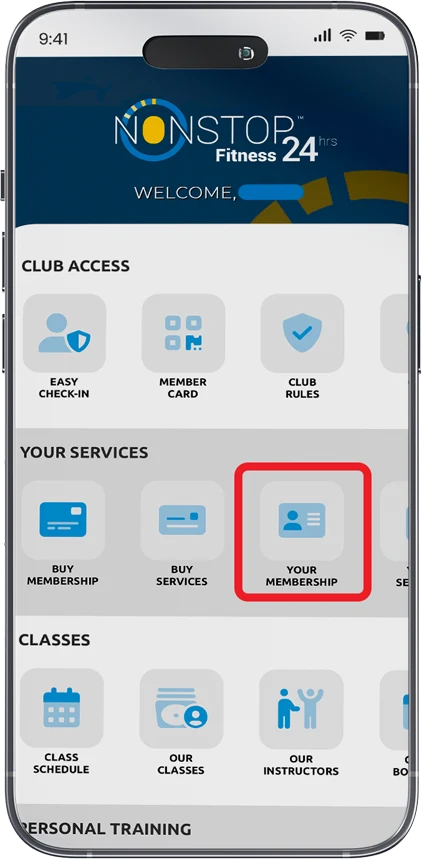
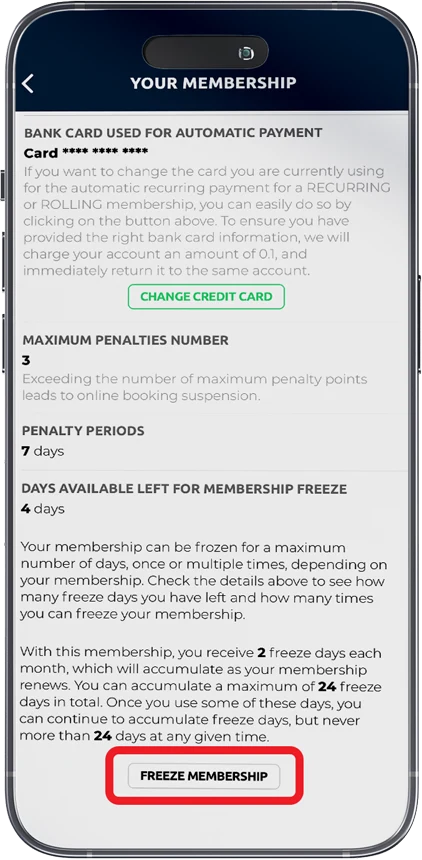
How to freeze your Loyalty membership in three steps:
1
Click on the
“Active membership”
section
2
Then select
“Freeze membership”
3
Choose
the number of pause days and confirm
1
Klikni na sekciju
“Aktivna članarina”
2
Potom na
“Zamrzni članarinu”
3
Odaberi
Broj dana pauze i potvrdi
Loyalty Program works even while you rest
Ne gubiš dane treninga ni novac.
Kada putuješ ili ti obaveze ne dozvoljavaju dolazak, članarina se pauzira bez dodatnih troškova.
Ostaješ aktivan član, čak i kada pauziraš.
Nema potrebe da prekidaš članarinu ostaješ sa nama i kad ti treba predah.
Automatsko produženje članarine.
Pauziraj članarinu za dostupne dane, i ona se automatski produžava za isti broj dana.
You don’t lose training days or money.
When you travel or your obligations don’t allow you to come, your membership is paused without extra costs.
Stay an active member even while pausing.
No need to cancel your membership, you remain with us even when you need a break.
Automatic membership extension
Pause your membership for the available days, and it automatically extends for the same number of days.
Additional
FAQ
How do I freeze my membership?
A:
Freezing can only be done through the app, on the exact day you want the pause to start (e.g., today for today). Scheduling in advance is not possible.
Can I use all my days at once?
A:
Yes, you can use all accumulated days at once or split them into several shorter breaks, as long as you don’t exceed the maximum of 24 days per year.
What if I change my mind after activating the pause?
A:
You can end the pause early and reactivate your membership directly in the app.
Does my membership billing date change when I use freeze days?
A:
Yes. Your next payment automatically shifts forward by the number of days you paused.
Where can I see how many days I have?
A:
In your profile within the app, you can see how many days you have collected and how many you’ve already used.
Can I freeze my membership at the reception desk?
A:
Freezing is only possible via the Non Stop Fitness app. The process is quick and simple it only takes a few clicks.
Do I lose my discount if I freeze my membership?
A:
No. Your discount remains intact, and your membership automatically extends by the number of days you froze.
When do I receive the new 2 freeze days?
A:
Every month, you automatically receive 2 new days, until you reach the maximum of 24 days per year.